
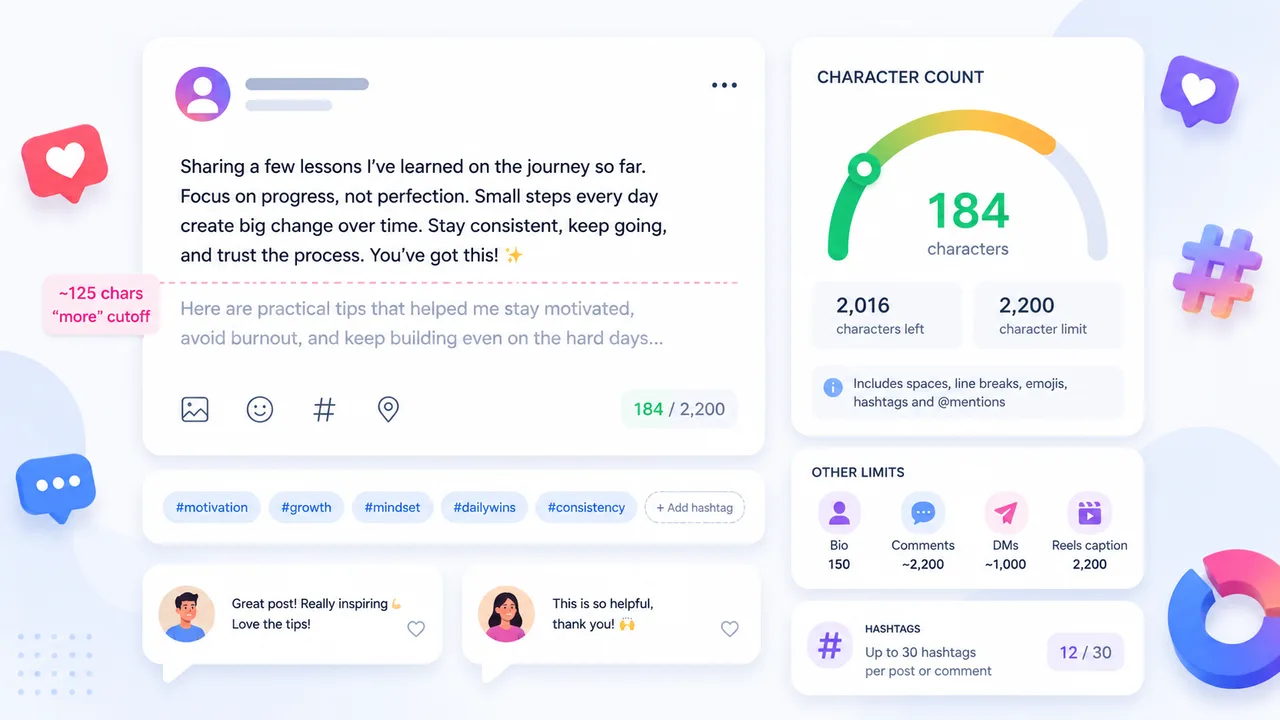
The key facts at a glance
- Captions and Reels captions: 2,200 characters
- Bio: 150 characters
- Username and profile name: 30 characters each
- Hashtags: up to 30 per post or comment
- Feed truncation: around 125 characters before the 'more' tap
- Check your caption length instantly →
Instagram has character limits for every part of your profile and posts — captions, bios, usernames, comments, and DMs each have their own ceiling. Hitting the wrong limit mid-edit is frustrating. Knowing the numbers in advance means you can write to fit, not cut at the last minute.
This guide covers every key Instagram character limit, explains how Instagram handles truncation, and shows you how to check your draft before you post.
Instagram Character Limits Table
| Field | Limit | Notes |
|---|---|---|
| Caption | 2,200 characters | Applies to feed posts and generally to Reels |
| Reels caption | 2,200 characters | Generally uses the same limit as feed captions |
| Bio | 150 characters | |
| Username | 30 characters | |
| Profile name | 30 characters | Displayed name above bio |
| Comments | Commonly reported around 2,200 characters | May vary; test before relying on this |
| DMs | Commonly reported around 1,000 characters | May vary by version and format |
| Hashtags | Up to 30 per post or comment | Exceeding 30 may suppress the post |
Note: Instagram limits can change, and display truncation may vary by device, app version and format. Always check your draft before publishing critical copy.
Instagram Caption Limit Explained
Instagram captions can be up to 2,200 characters long. That is a generous limit — roughly the length of three to four average paragraphs of body text. Most captions, even detailed ones, sit well below it.
The limit exists to prevent abuse and keep feeds manageable, not because Instagram expects you to fill it. In practice, the bigger constraint is usually attention, not characters.
When long captions work:
- Storytelling posts where the narrative is the point
- Tutorial or how-to content where steps need explanation
- Behind-the-scenes captions where context adds value
In all of these cases, a long caption only works if the first sentence is strong enough to make someone want to tap “more.” That opening line is doing the hardest work in the post.
When long captions hurt:
- Product promotion where the image or video should lead
- Reels where most viewers are watching quickly and scrolling fast
- Posts where the key action (visit link in bio, save, share) gets buried
If your caption is longer than a few sentences, read the first 125 characters carefully. That is what most people see before deciding whether to tap for more.
The 125-Character “More” Cutoff
Instagram truncates feed captions at around 125 characters and replaces the rest with a “more” tap. The exact character count can vary slightly depending on device, screen size, and app version — but 125 is a reliable working number.
This means your first 125 characters are effectively your headline. Everything after that is secondary.
Practical examples of strong openings under 125 characters:
- “This one change cut our response time by half — here’s what we did.” — 66 characters. Hook first, explanation follows.
- “New collection live. Each piece is made to order. Link in bio.” — 62 characters. Clear, complete, no filler.
- “I almost didn’t post this. But I think it matters.” — 51 characters. Curiosity-based open that earns the tap.
What not to lead with:
- Hashtag blocks — they push the real content out of the visible zone
- Filler phrases like “Hey everyone!” or “So excited to share…”
- Credits or tags if they are not the main point of the post
Put the hook, the offer, the question, or the key fact in the first 125 characters. Use the rest of the caption for depth.
Instagram Bio, Username and Profile Name Limits
Bio — 150 characters
Your Instagram bio has a 150-character limit. That sounds tight, but it is workable if you write directly. A bio that tries to say everything usually says nothing clearly. One or two focused lines — what you do, who you help, or what someone can expect from your account — is almost always more effective than a list of everything you could mention.
Username — 30 characters
Your Instagram username (the @handle) is limited to 30 characters. Usernames can only contain letters, numbers, underscores, and periods — no spaces or special characters. Short usernames are easier to remember, easier to type, and easier to tag.
Profile name — 30 characters
The profile name is the bold display name shown above your bio. It also has a 30-character limit. Unlike your username, the profile name can include spaces, emojis, and accented characters. Some accounts use this field for a keyword-rich description rather than a personal name, since it can appear in Instagram search results.
Concise, clear profile copy makes it easier for new visitors to decide quickly whether to follow — which is the primary job of your profile page.
Do Spaces, Hashtags, Emojis and URLs Count?
Yes — all of them count toward your character total on Instagram.
Spaces count as characters. Every space in your caption, bio, or comment adds to the count.
Line breaks count too. Each paragraph break in your caption is a character. If you use spacing for visual formatting, those blank lines are part of your total.
Hashtags count as characters. A hashtag like #contentcreator is 15 characters including the # symbol. If you use 10 hashtags, each averaging 15 characters plus a space, that is around 160 characters before your actual caption text begins — assuming they are at the end.
@mentions count as characters in the same way. Tagging @username in your caption uses characters equal to the length of the handle plus the @ symbol.
Emojis count, but emoji character counting can vary depending on how the platform or system handles Unicode. Some emojis take up more space internally than a single visible character. For practical caption writing, treat each emoji as one or two characters and leave a small buffer.
URLs count as typed text on Instagram. Instagram does not shorten URLs the way X/Twitter does. If you paste a full URL into your caption — for example https://yourwebsite.com/some-long-page-name — every character in that URL counts against your 2,200-character limit. This is one reason most Instagram accounts direct followers to “the link in bio” rather than pasting long URLs into captions.
For a deeper look at how spaces and invisible characters work across platforms, see: Do Spaces Count as Characters?
Best Instagram Caption Length
There is no single correct caption length. The right length depends on what the post is trying to do.
Around 138–150 characters is a practical range for many captions. It fits comfortably within the visible zone before “more,” it is long enough to give context or a clear call to action, and it is short enough to write and edit quickly. It is a useful default if you are unsure.
Very short captions — under 50 characters or even a single line — can work well when the image or video carries the weight. A single strong sentence alongside a visually complete piece of content can be more effective than a longer explanation that dilutes it.
Longer captions — several paragraphs or more — work when the content genuinely benefits from explanation, story, or teaching. Educational posts, personal stories, and process breakdowns regularly perform well with long captions, provided the first sentence earns the read.
A few principles that apply regardless of length:
- Put the most important point first, not last
- Write the whole caption, then cut anything that does not add to it
- Read the first 125 characters aloud before posting — that is what most people see
- Do not end with a wall of hashtags that buries your closing line
The goal is not a specific character count. The goal is a caption that does its job — and does not waste the reader’s time getting there.
Check Your Instagram Caption with TextLimits
The most reliable way to know your character count before posting is to check it directly, not estimate.
Paste your caption into the TextLimits Instagram preset to check it against the 2,200-character limit and see exactly how much room you have left. The limit gauge updates live as you type or edit.
TextLimits is private — your text is processed entirely in your browser and never sent to any server. There is no login, no account, and no upload. The character count is instant.
You can also use the Social Media Character Counter to check limits for other platforms — X/Twitter, LinkedIn, SMS, meta descriptions, and more — all in one place.
Frequently Asked Questions
What is the Instagram caption character limit? Instagram captions can be up to 2,200 characters. This applies to regular feed posts and generally to Reels captions as well.
What is the Instagram bio character limit? The Instagram bio is limited to 150 characters. Spaces, line breaks, emojis, and punctuation all count toward this limit.
How many hashtags can I use on Instagram? You can use up to 30 hashtags per post or comment. Using more than 30 may suppress the post in hashtag feeds. Each hashtag also counts toward the character limit of the caption or comment.
Does the Instagram character limit include spaces? Yes. Spaces count as characters on Instagram. Every space in your caption, bio, or comment is included in the total character count.
Do hashtags count as characters on Instagram?
Yes. Each hashtag — including the # symbol — counts as characters. A hashtag like #photography is 13 characters.
Do emojis count as characters on Instagram? Yes, emojis count toward the character limit. Emoji character counting can vary slightly depending on the system, but for practical purposes you should treat each emoji as using one or two characters and leave a small buffer.
What is the Instagram Reels caption limit? Reels captions generally use the same 2,200-character limit as regular feed captions. This may vary depending on app version — always check your draft before posting.
What is the Instagram DM character limit? Instagram DMs are commonly reported to allow around 1,000 characters per message, though this can vary by app version and format. If you are sending long messages, check the field before sending.
Why does Instagram cut off my caption? Instagram truncates feed captions at around 125 characters in the feed view, showing a “more” tap to reveal the rest. This is a display decision, not a limit — your full caption is saved. It means the first 125 characters of your caption are the most important.
How can I check my Instagram caption length? Paste your caption into the TextLimits Instagram preset. It shows your character count live against the 2,200-character limit. Your text stays in your browser — nothing is stored or sent anywhere.
Try it free
Check your Instagram caption length
Paste your caption into the TextLimits Instagram preset to check the 2,200-character limit and see exactly how much room you have left. Private, instant, no login.
Check your Instagram caption length →