
The key facts at a glance
- Different tools count characters for different purposes — neither is necessarily wrong
- Hidden formatting from Word, PDFs, or copy-paste can add invisible characters to your count
- Line breaks may count as one character (LF) or two (CRLF) depending on where the text came from
- Smart quotes usually count the same as straight quotes in general counters, but can trigger Unicode mode in SMS
- Emojis and accented characters may count differently depending on platform and encoding
- Some platforms apply their own rules — X/Twitter shortens URLs; SMS switches encoding modes
- Fix: clean the text, remove hidden formatting, then recheck in a live counter
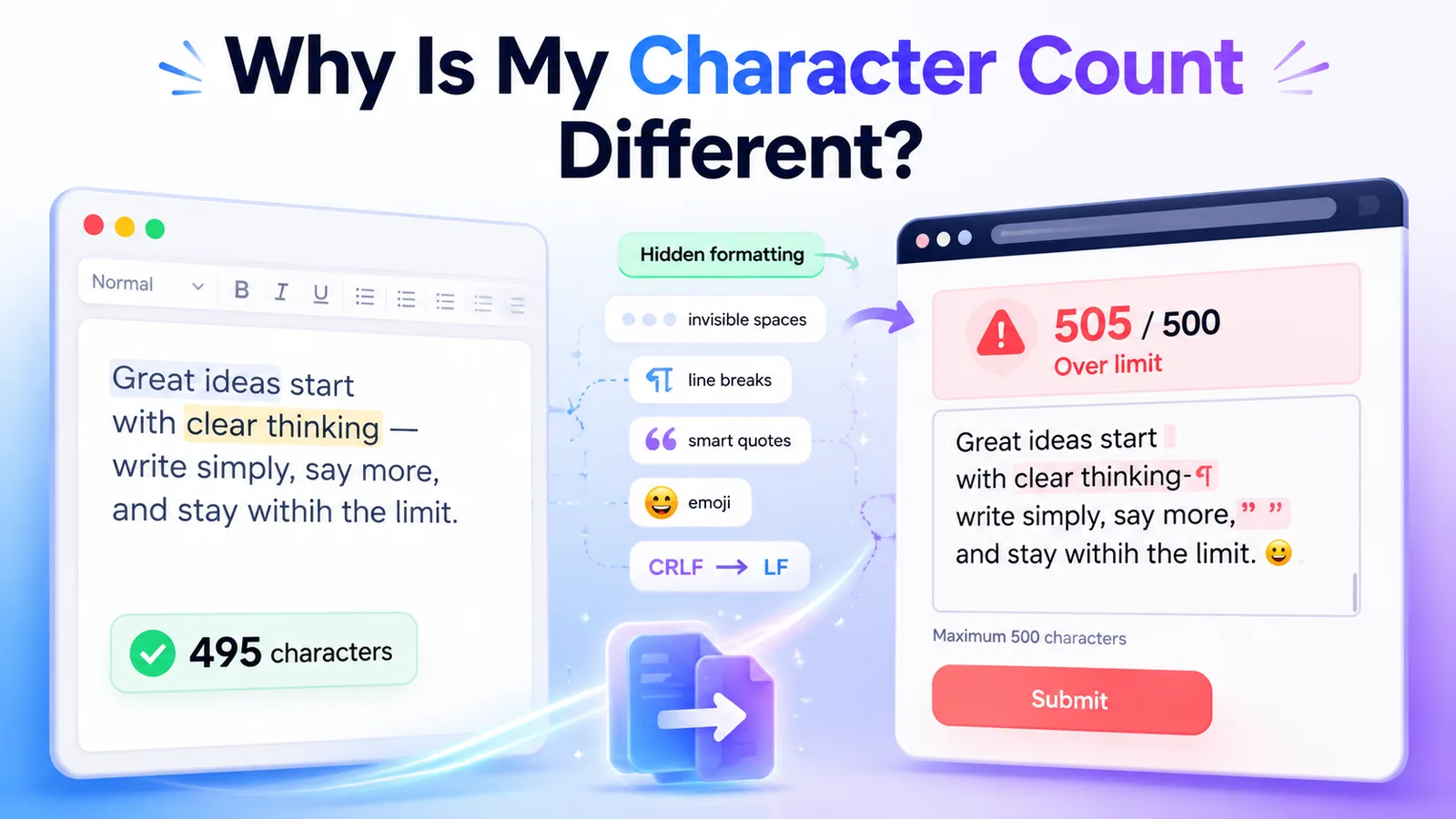
If you have ever pasted a draft from Microsoft Word into a web form and received an error, you are probably wondering: why is my character count different? Desktop word processors and online platforms often use different rules to count text. Hidden formatting, line breaks, and pasted invisible characters can secretly inflate your character count, causing your submission to fail.
The short answer is that different tools count characters for different purposes — a word processor is built for writing documents, while a web form counts characters according to storage, submission, or platform rules. They are not always measuring the same thing.
Quick Answer: Why Character Counts Mismatch
| Issue | Why it changes the count | How to fix it |
|---|---|---|
| Hidden formatting from Word or PDFs | Invisible characters (tabs, non-breaking spaces, zero-width spaces) paste along with your text | Run text through the Text Cleaner before pasting |
| Trailing or double spaces | Extra spaces that are invisible to the eye still count | Use the Text Cleaner to normalize whitespace |
| Line breaks | Each Enter/Return adds a hidden character; some tools exclude these, others include them | Remove unnecessary line breaks with the Remove Line Breaks tool |
| CRLF vs LF | Windows-style text uses two characters per line ending instead of one | Text Cleaner normalizes line endings |
| Smart quotes | Smart quotes usually count the same as straight quotes, but can trigger Unicode mode in SMS and drop the per-message limit from 160 to ~70 | Text Cleaner converts smart quotes to straight quotes |
| Em dashes | — is not in standard SMS encoding; can trigger Unicode mode | Replace with a hyphen - for SMS |
| Emojis | May count as 1, 2, or more characters depending on type and platform; can trigger SMS Unicode mode | Paste with emojis and check the live count |
| URLs on social platforms | X/Twitter shortens all URLs to a fixed character count regardless of actual URL length | Check count in the platform’s own composer |
Reason 1: Hidden Formatting From Word and PDFs
When you copy text from Microsoft Word, a Google Doc, a PDF, or a web page, you often carry along invisible characters that your eyes cannot see but a character counter will count. These include:
- Non-breaking spaces — a special space character (
) that looks identical to a normal space but has a different code. Often inserted automatically by word processors and websites to prevent awkward line wrapping. - Zero-width spaces — a completely invisible character sometimes used in web content and certain CMS editors. You cannot see it at all, but it counts in many character counters and strict form validators.
- Tabs — the tab character looks like a wide space on screen but is encoded differently and may count separately.
- Trailing spaces — spaces at the end of a line or paragraph that are invisible but still use up character budget.
- Double spaces — two spaces between words or sentences instead of one.
These hidden characters are a very common reason for a character count mismatch. Your word processor may show a clean count because it normalizes whitespace for display. The web form counts every character in the raw pasted text.
Fix: Paste your text into the TextLimits Text Cleaner before submitting. It strips hidden characters, normalizes spaces, and removes the invisible formatting that word processors leave behind.
Reason 2: How Line Breaks Are Counted
When you press Enter at the end of a paragraph, your software inserts a hidden newline character into the text. Whether a character counter includes that character in its total depends on the tool:
- Most online forms and platform character limits count line breaks — each paragraph break uses at least one character from your budget.
- Some word processors and counters exclude line breaks from the main character count, showing only visible characters.
- TextLimits’ main “Characters” count excludes line breaks by default, matching what most users expect when checking visible text. The “Chars incl. line breaks” figure is available in the expanded details.
This means pasting a multi-paragraph draft into a form can show a higher count than your word processor predicted — every paragraph break you did not see counted suddenly appears in the total.
→ Full guide: Do Line Breaks Count as Characters?
Reason 3: CRLF vs LF Line Endings
Not all line breaks are encoded the same way. There are two common formats:
- LF (line feed) — a single character (
\n), the standard on macOS, Linux, and most web systems - CRLF (carriage return + line feed) — two characters (
\r\n), the older Windows standard, still produced by some Windows applications and certain email clients
If you write in a Windows application and paste into a web form, your line breaks may each be two characters instead of one. A 500-word draft with 20 paragraph breaks could silently be 20 characters longer than you expected. The same-looking text has a different raw character count depending on its origin.
The TextLimits Text Cleaner normalizes line endings as part of its cleanup.
Reason 4: Smart Quotes, Em Dashes, and SMS Encoding
Word processors automatically convert straight quotation marks (" and ') into smart (curly) quotes (", ", ', '). They also often convert a double hyphen -- into an em dash —. These substitutions look better in a document — but they can cause problems elsewhere.
Character count: Smart quotes and em dashes each count as one character in most general character counters, the same as their straight equivalents. The count difference is usually zero.
SMS encoding risk: Standard SMS uses GSM-7 encoding, which does not include smart quotes, en dashes, em dashes, or the ellipsis symbol. If any of these characters appear in an SMS message, the entire message switches to Unicode encoding — which drops the per-message character limit from 160 to around 70, for the whole message, not just the problem character.
A single smart apostrophe pasted from Word into an SMS template can quietly cut your effective message length by more than half. This is a significant and common cause of unexpected SMS character count failures.
→ More detail: Do Punctuation Marks Count as Characters? and SMS Character Limit Guide
Reason 5: Emojis and Accented Characters
Emojis count as characters on virtually all platforms, but the number of characters a single emoji uses varies:
- Simple emojis (😀) are often one character in general counters
- Emojis with skin tone modifiers (👍🏽 thumbs-up with skin tone) are usually two or more characters internally
- Flag emojis (🇺🇸 flag emoji) are typically two regional indicator characters
- Combined family emojis (👨👩👧👦 family emoji) can be four or more characters
In SMS, adding even one emoji can trigger Unicode encoding and reduce the per-message limit from 160 to around 70 characters. Your word processor’s character count will not reflect this because it does not apply SMS encoding rules.
→ Full guide: Do Emojis Count as Characters?
Accented characters (such as é, ñ, ü) each count as one character in most modern tools. However, some accented characters fall outside the standard SMS GSM-7 character set and can also trigger Unicode mode. If your text includes accented characters for an SMS campaign, check the actual message behavior carefully.
Reason 6: Platform-Specific Rules
Some platforms apply their own counting rules that differ from any general character counter:
X/Twitter historically shortens all URLs — regardless of actual length — to a fixed character count. A 100-character URL and a 10-character URL may count the same toward your post limit. X/Twitter may also apply special rules to certain emoji or non-Latin characters. The platform’s own composer is the only reliable counter for Twitter/X posts.
→ Details: X/Twitter Character Limit Guide
Forms with “characters excluding spaces” use a different rule than the default. A counter showing “characters with spaces” will always give a higher number than one measuring “without spaces” for the same text. If your form specifies one and you are checking with the other, the counts will always be different.
Social media and web platforms may also have their own display truncation limits that are shorter than the maximum submission limit — the character counter shows the full limit, but the post may still be cut off in preview.
How to Fix a Mismatched Character Count
If your character count is coming out different between tools, this three-step process resolves most cases:
Step 1: Clean the text Paste your text into the TextLimits Text Cleaner. This strips hidden formatting, removes zero-width spaces and non-breaking spaces, normalizes smart quotes to straight quotes, and standardizes line endings. This one step fixes the most common causes of count mismatches.
Step 2: Remove what you do not need After cleaning, check for and remove:
- Unnecessary blank lines between paragraphs — use the Remove Line Breaks tool if needed
- Extra spaces (the cleaner handles most of these)
- Smart quotes or em dashes if you are preparing SMS copy
Step 3: Recheck the final count Paste the cleaned text into the TextLimits character counter to confirm the final count before submitting. For platform-specific work — especially SMS or Twitter/X — also check against the platform’s own counter.
For broader guidance on trimming text to fit a limit, see How to Fit Text Into a Character Limit and How to Reduce Character Count.
For a complete overview of everything that can affect your character count, see What Counts as a Character?
FAQ
Why is my character count higher online than in Microsoft Word? Online forms usually count every character in the raw pasted text, including hidden characters that word processors may normalize for display — non-breaking spaces, zero-width spaces, tabs, smart quotes, and CRLF line endings. Paste your text through the Text Cleaner to remove these before pasting into the form.
Does copying and pasting text add characters? It can. Copying from a word processor, PDF, web page, or email often brings invisible formatting characters — non-breaking spaces, zero-width spaces, extra tabs, and smart quotes — that are not visible but are counted. The Text Cleaner strips most of these.
Do line breaks count as one or two characters? It depends on where the text came from. Most modern systems use a single LF character per line break. Text created in Windows applications often uses CRLF — two characters per line break. After pasting, the same-looking text can have a different character count depending on its origin. See Do Line Breaks Count as Characters? for the full explanation.
Why did X/Twitter count my text differently? X/Twitter applies its own counting rules. URLs are shortened to a fixed character count regardless of actual length. Some emoji and non-Latin characters may also be counted differently. For Twitter/X specifically, the platform’s own composer is the most accurate counter. See the X/Twitter Character Limit Guide for details.
Can smart quotes affect SMS limits? Yes. Smart (curly) quotes are not part of the standard GSM-7 SMS character set. If an SMS message contains even one smart quote, the entire message typically switches to Unicode encoding, reducing the per-message limit from 160 characters to around 70. The Text Cleaner can normalize smart quotes to straight quotes before you send. See the SMS Character Limit Guide for more.
How can I fix a mismatched character count?
- Paste your text into the Text Cleaner to strip hidden formatting and normalize smart quotes.
- Use the Remove Line Breaks tool if you have unnecessary blank lines.
- Paste the cleaned text into the character counter to confirm the final count before submitting.
Try it free
Clean hidden formatting before submitting
Paste your text into the TextLimits Text Cleaner to strip hidden formatting, normalize smart quotes, and remove invisible characters — free, no sign-up, processed in your browser.
Clean hidden formatting before submitting →